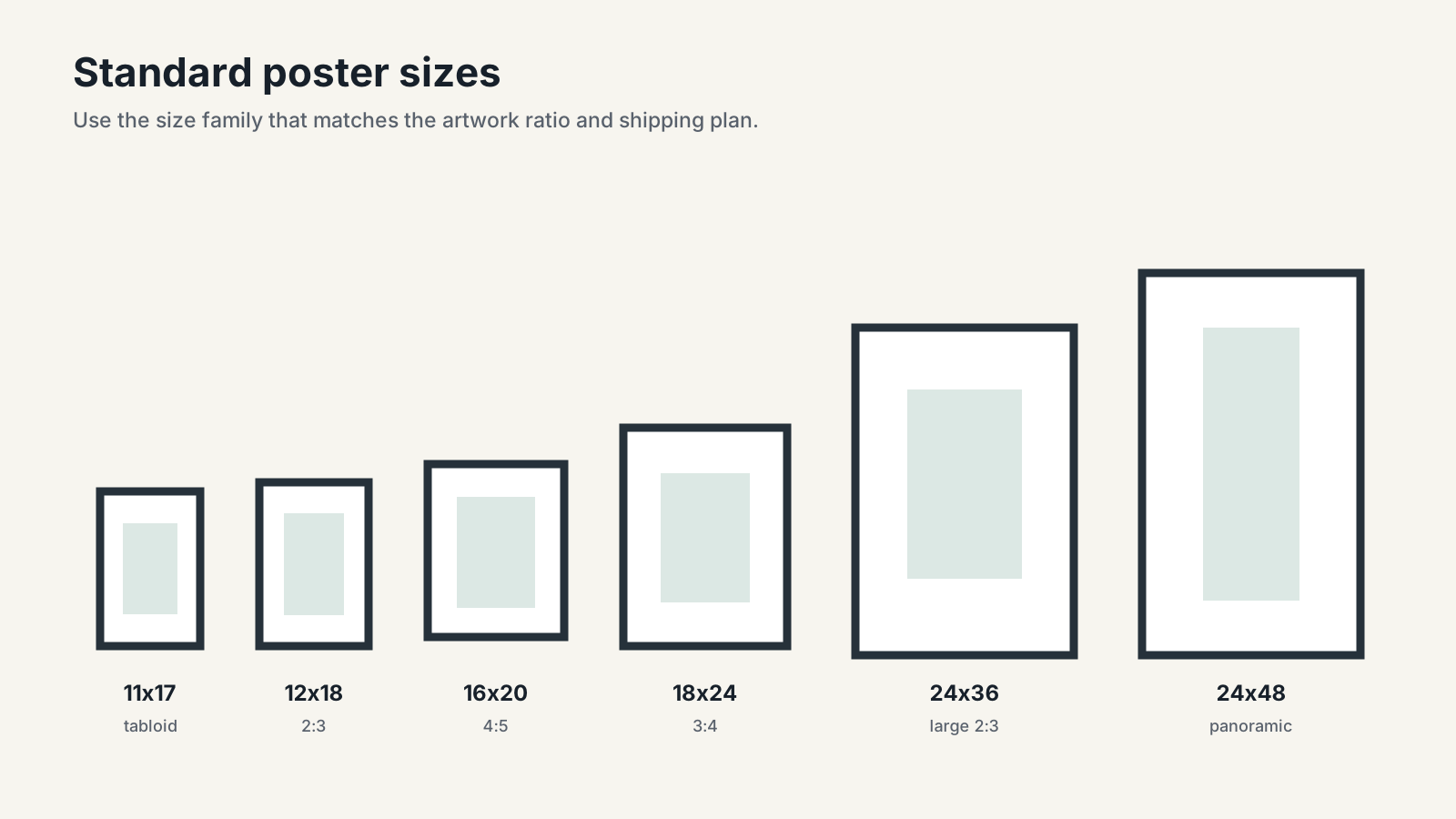
Common US poster conventions include 11x17, 12x18, 18x24, 24x36, and 27x40 inches. Art sellers also use frame-friendly print sizes such as 8x10, 11x14, and 16x20, while international shops often add A4 through A1. There is no single official US poster-size system, so the right choice depends on the artwork ratio, frame availability, printer, buyer market, and room.
This guide is for artists, photographers, Etsy sellers, and print-on-demand shops. It connects physical dimensions to pixels, frames, mats, bleed, listing files, shipping, and realistic wall presentation.
On this page
- Poster sizes at a glance
- Poster, frame, mat, and outer-size definitions
- Common US poster and art-print sizes
- International A-series sizes
- Aspect ratios and cropping
- Pixels and print resolution
- Bleed, trim, and safe areas
- Frames and mats
- Artwork size for a wall
- Etsy and POD size planning
- Printing and shipping
- Common sizing mistakes
- True-scale preview
- FAQ
Poster sizes at a glance
Use this table as a starting point, not as a universal product catalog. The pixel dimensions assume 300 pixels per inch (PPI) at the final trimmed size and do not include bleed.
| Print size | Centimeters | Aspect ratio | Pixels at 300 PPI | Typical use |
|---|---|---|---|---|
| 8x10 in | 20.3x25.4 cm | 4:5 | 2400x3000 px | Small art print, shelf, gift |
| 11x14 in | 27.9x35.6 cm | 11:14 | 3300x4200 px | Gallery wall, small framed print |
| 11x17 in | 27.9x43.2 cm | 11:17 | 3300x5100 px | Tabloid poster, event print |
| 12x18 in | 30.5x45.7 cm | 2:3 | 3600x5400 px | Photography and small poster |
| 16x20 in | 40.6x50.8 cm | 4:5 | 4800x6000 px | Medium art print |
| 18x24 in | 45.7x61 cm | 3:4 | 5400x7200 px | Medium-to-large wall poster |
| 20x30 in | 50.8x76.2 cm | 2:3 | 6000x9000 px | Photography and statement print |
| 24x36 in | 61x91.4 cm | 2:3 | 7200x10800 px | Large poster and wall art |
| 27x40 in | 68.6x101.6 cm | 27:40 | 8100x12000 px | Modern theatrical one-sheet format |
For a faster dimension lookup, open the interactive poster size chart and shortlist only the ratios your artwork can actually support without awkward cropping. That tool owns the broad chart task; this guide covers how sellers should apply those dimensions to real products and listings.
Poster size, print size, frame size, mat opening, and outer size
These terms are often mixed together in marketplace listings, but they describe different measurements:
- Poster or print size is the final trimmed paper dimension, such as 18x24 inches.
- Frame opening or nominal frame size is the print size the frame is intended to hold. An 18x24 frame generally holds an 18x24 print without a mat.
- Mat opening is the visible cutout. It is normally slightly smaller than the artwork so the mat overlaps and holds the print.
- Outer frame size is the total footprint on the wall, including the frame profile. It is larger than the nominal frame size.
- Image area is the part of the paper occupied by the artwork. It may be smaller than the sheet when the design includes a printed white border.
For example, an 11x14 print can go into an 11x14 frame for an edge-to-edge presentation, or a larger frame with a mat around it. The exact outer frame and mat opening depend on the manufacturer, so don't assume two brands use identical outside dimensions. And don't advertise "frame size" when you mean "print size" - that mix-up is where most listing complaints start.
If framing is the reader’s main task, send them to the frame size chart or the deeper frame-size guide for wall art.
Common US poster and art-print sizes
US shops use a mix of retail-frame dimensions, photography ratios, office paper sizes, and entertainment-industry formats. These are conventions rather than one official national poster standard.
Small and medium art prints
5x7 and 8x10 are the gift-and-shelf sizes. An 8x10 file at 4:5 scales cleanly to 16x20, but not to 12x18 or 24x36, so don't promise all three from one crop. 11x14 looks like it belongs in the same family. It doesn't: the 11:14 shape is close enough to 4:5 that sellers get away with reusing an 8x10 file, though check the crop before you ship it rather than assuming it'll stretch to fit.
11x17, the US tabloid sheet, sits outside all three ratio families (2:3, 3:4, 4:5): a useful compact poster format, just not one you can derive from an 8x10 or 12x18 master file. 12x18 is the photography workhorse, pure 2:3, and scales directly to 20x30 and 24x36 with zero recropping. 16x20 rounds out the medium sizes at 4:5, bigger than an 8x10 with the same crop.
Large poster formats
18x24 is the most common large-format size for a reason: 3:4 gives it more wall presence than 16x20 without stretching into the long 2:3 shape. 24x36 is the other big seller, and because it's 2:3, the same composition that works for 12x18 and 20x30 scales straight up to it.
27x40 is a trap for anyone assuming it's just a bigger 24x36. It's close to 2:3 but not exact, so movie-poster buyers and collectors expect files and frames built specifically for 27x40; substitute 24x36 and the crop will be visibly off.
Panoramic formats like 12x36 or 24x48 don't behave like scaled-up standard sizes at all. They need their own mockups, their own packaging check, and their own frame plan. Treat them as specialty products, not default "standard" options.
International A-series print and poster sizes
The A-series is useful because every size keeps the same 1:√2 aspect ratio. A design prepared for A4 can scale to A3, A2, A1, or A0 without changing its crop, provided the file has enough resolution.
ISO 216 defines trimmed A- and B-series paper for writing paper and certain printed matter. ISO explicitly notes that the standard does not necessarily apply to posters or other special items. In practice, however, A-series dimensions are commonly offered for posters and art prints outside the US.
| A size | Millimeters | Inches | Pixels at 300 PPI | Typical wall-art role |
|---|---|---|---|---|
| A4 | 210x297 mm | 8.3x11.7 in | 2480x3508 px | Small print or home-printable file |
| A3 | 297x420 mm | 11.7x16.5 in | 3508x4961 px | Small poster |
| A2 | 420x594 mm | 16.5x23.4 in | 4961x7016 px | Medium poster |
| A1 | 594x841 mm | 23.4x33.1 in | 7016x9933 px | Large poster |
| A0 | 841x1189 mm | 33.1x46.8 in | 9933x14043 px | Extra-large display |
An A2 print is close in overall area to 18x24, but it is not the same shape or size. Do not call A2 “equivalent” to 18x24 in a frame-fit promise. Offer an A-series file or product when the printer and target market support it.
Art-print and photography size families
The cleanest seller workflow is to organize products by aspect-ratio family, not by a random list of dimensions.
| Ratio family | Common sizes | Best suited to |
|---|---|---|
| 2:3 | 4x6, 8x12, 12x18, 16x24, 20x30, 24x36 | Photography, tall or wide compositions |
| 3:4 | 6x8, 9x12, 12x16, 18x24 | Illustration, portraits, balanced wall art |
| 4:5 | 8x10, 12x15, 16x20, 20x25 | Art prints and widely available frames |
| 5:7 | 5x7, 10x14, 20x28 | Small gifts and selected art products |
| 11:14 | 11x14, 22x28 | Frame-specific art products |
| 1:1 | 8x8, 12x12, 16x16, 20x20 | Square artwork and sets |
| 1:√2 | A4, A3, A2, A1, A0 | International A-series products |
One artwork can be sold in multiple families. Each one still needs its own deliberate crop. A seller who promises 8x10, 11x14, 12x18, 18x24, and A2 from a single unchanged file is actually promising five different shapes, whether they realize it or not.
Aspect ratios: where cropping problems begin
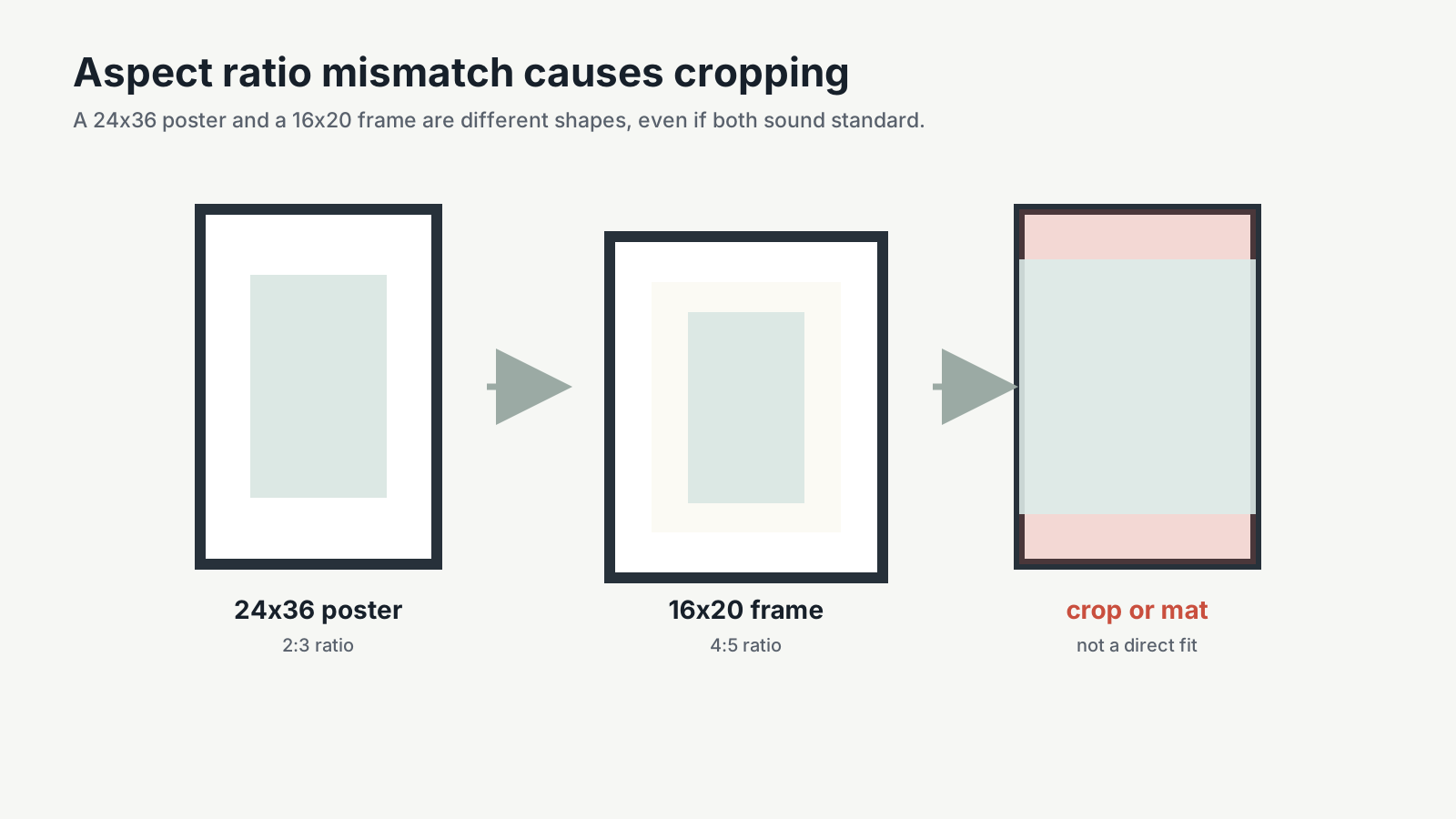
Aspect ratio is the relationship between width and height. A 12x18 and a 24x36 are both 2:3, so they show the same composition at different sizes. A 16x20 is 4:5, so it is visibly squarer.
When ratios differ, there are only three honest options:
- Crop the artwork. The simplest fix, but you lose content from two edges, so check what's actually sitting along those margins before you commit to it.
- Add borders. The whole image survives, just with visible paper around it. That reads as intentional on some designs and cheap on others.
- Create a separate composition for each ratio. More upfront work, and the only option that gives every size a controlled result instead of a compromise.
Never stretch the image to fit. Stretching changes the artwork itself and can make circles, faces, type, and frame geometry look wrong.
For digital-download listings, include a simple file guide that maps each filename to its ratio and supported print sizes. For physical products, show only the sizes the selected printer actually offers.
Pixels, PPI, and recommended print resolution
The reliable formula is:
pixels = print inches × target PPI
At 300 PPI, an 18x24 print needs 5400x7200 pixels and a 24x36 print needs 7200x10800 pixels. At 200 PPI, those dimensions are lower, but fine details may be less crisp when viewed closely.
PPI describes pixels in the source image per printed inch. DPI describes printer dots, although marketplace and printer documentation often uses “DPI” when discussing uploaded image resolution. What matters for file preparation is whether the pixel dimensions support the final printed size.
Printful’s current poster-file guidance recommends 300 DPI, sRGB, the correct orientation, and checking the file guidelines for each product. It also notes that product templates can differ. Treat 300 PPI as a strong preparation target, not a guarantee that every provider has identical minimums.
Use the print resolution checker before advertising a large size. It calculates the effective PPI from the real pixel dimensions instead of trusting an editable metadata field.
Quick pixel conversion table
| Final print | 300 PPI | 240 PPI | 150 PPI |
|---|---|---|---|
| 8x10 | 2400x3000 | 1920x2400 | 1200x1500 |
| 11x14 | 3300x4200 | 2640x3360 | 1650x2100 |
| 12x18 | 3600x5400 | 2880x4320 | 1800x2700 |
| 16x20 | 4800x6000 | 3840x4800 | 2400x3000 |
| 18x24 | 5400x7200 | 4320x5760 | 2700x3600 |
| 24x36 | 7200x10800 | 5760x8640 | 3600x5400 |
Large prints are often viewed from farther away, so a professional printer may approve a lower effective PPI for a specific product. Ask the printer rather than silently upscaling a small file.
Bleed, trim, and safe areas
Three terms show up on every printer's spec sheet and none of them mean "print size." Trim size is what you get after cutting. Bleed is the extra artwork that hangs past the trim edge so a slightly off-center blade doesn't leave a thin white sliver. Safe area is the inner zone where anything important, a face, a signature, small type, needs to stay clear of trimming, matting, or frame overlap.
Skip the temptation to add one generic bleed amount to every product and call it done. A 300-PPI file at 0.125 inch of bleed on every edge needs roughly 38 extra pixels per edge, or about 75 pixels added across each dimension, but that number changes with the printer. Download the current template for the exact size you're producing. The printer's template is the authority, not this math.
For a full-bleed poster:
- Extend backgrounds and edge-to-edge artwork through the bleed.
- Keep signatures, faces, type, and thin borders inside the safe area.
- Avoid placing a decorative border very close to trim; small cutting variation becomes obvious.
- Export the color profile and file format requested by the printer.
Reusing a file prepared for a different provider is asking for a trimmed edge or a white sliver you didn't design in. Every printer specs its own bleed, so the only reliable move is checking that specific product's template before you upload anything, not assuming last month's file guide still applies.
Choosing a frame and mat
For a flush fit, match the stated print opening: an 18x24 poster goes into an 18x24 frame. Then check product details, because the finished outside dimensions will be larger.
For a matted presentation:
- Choose the print size.
- Choose a larger outer frame.
- Confirm the mat’s outside size matches the frame opening.
- Confirm the mat opening is slightly smaller than the print so the artwork is held securely.
- Check how much image area the mat will cover.
A mat does not magically fix every ratio mismatch. A 24x36 print cannot be placed inside a smaller 16x20 frame, full stop. What a mat can do is fit a smaller print into a larger frame, or present a differently shaped image inside a compatible outer frame. The physical sheet still has to fit somewhere.
If you sell framed products, list three measurements where possible: print size, nominal frame size, and finished outer size. Also state whether the frame and mat are included or are display-only in the mockup.
Choosing artwork size for a wall
Start with the wall zone or furniture, not with a marketplace dropdown. For art above a sofa, bed, console, or dresser, a useful design starting point is for the finished artwork or arrangement to occupy roughly 60% to 75% of the furniture width. It is a visual guideline, not a building rule.
| Placement | Practical starting point |
|---|---|
| Desk or reading nook | 8x10 to 16x20, depending on wall width |
| Narrow console | 16x20, 18x24, or two smaller coordinated prints |
| Dresser | 18x24, 20x30, 24x36, or a balanced pair |
| Sofa or bed | One large work or a multi-piece arrangement sized from furniture width |
| Open statement wall | 24x36, A1, A0, or a larger custom format after measuring |
Use the wall art size calculator for a measured starting range, then upload the same file to the poster mockup generator and drop it into a real room during the free trial. Two prints with the same width can feel very different once frame profiles, mats, furniture, and ceiling height are visible, so don't finalize a size from a spec sheet alone.
Which poster sizes should Etsy and POD sellers offer?
Most new shops try to launch with every dimension in this guide, then spend the first month drowning in mockups and product variants. Pick one or two ratio families that match the artwork and the products your printer can fulfill reliably, and add sizes only once those are selling.
A practical starting catalog might be:
- 2:3 family: 12x18 and 24x36 for photography or elongated artwork.
- 3:4 family: 12x16 and 18x24 for illustration and balanced portraits.
- 4:5 family: 8x10 and 16x20 for frame-friendly art prints.
- International add-on: one A-series master file that supports A4 through A1 at sufficient resolution.
That is an example, not sales-volume data. Validate it against your buyer locations, printer catalog, margins, and existing customer questions.
Physical print sellers have a longer checklist before locking in a catalog: paper type and finish, frame availability and finished outer dimensions, whether the provider crops automatically, packaging method by product and destination, replacement policy for bends or crushed tubes, and how much shipping price jumps between sizes. Skip any one of these and you'll find out about it from a support ticket instead of a spec sheet.
Digital sellers need a file-delivery plan. Etsy currently allows up to five files per digital listing, with a maximum of 20 MB per file, and Etsy does not support variations for digital items. Group ratios logically, use ZIP files when appropriate, and give buyers a one-page size map with clear filenames.
For the broader launch workflow, use the guide to selling art prints on Etsy.
Etsy listing-image and mockup considerations
The printable file and the listing image are different assets. A 7200x10800-pixel 24x36 print file should not automatically be uploaded as the storefront mockup.
Etsy recommends listing images with width and height of at least 2000 pixels. Beyond that minimum, treat the hero image like the thumbnail it's about to become: horizontal or square, enough negative space that a crop doesn't slice off the artwork, and sRGB color so it doesn't look washed out next to competing listings in a search grid.
For wall art, build a listing set that answers:
- What does the artwork look like in a room?
- How large is the selected size relative to furniture?
- Is the frame included?
- What files or physical product arrive?
- Which sizes and ratios are available?
Use true-scale room mockups for context, plus a separate size chart for exact dimensions. Do not place every ratio label into the hero image; small text becomes unreadable in search thumbnails. The wall art size comparison maker builds that size-reference slide directly from your art: tick every size you sell and it draws them all at true scale above a sofa and a person, sized to Etsy's 2000px recommendation.
Printing at home versus using a professional printer
Home printing is useful for proofs and smaller products that fit the printer’s supported paper path. It gives immediate color and margin feedback, but borderless printing, ink cost, paper handling, and maximum sheet size vary by device.
A professional printer or POD provider earns its cut in a few specific situations: the size exceeds what your home printer's paper path supports, consistent color and paper stock need to match across every order, or the job is large-format, archival, or otherwise specialty work a desktop printer can't touch. It's also the right call once the provider needs to fulfill and ship orders directly, or once framed-product runs need to be repeatable rather than one-off.
Before publishing a size, order a sample. Check crop, color, paper surface, edge damage, frame fit, protective packaging, and how tightly a rolled print curls after opening. A print that won't lie flat after 48 hours out of the tube generates more "is this damaged" messages than any actual defect does.
Packaging and shipping are provider-specific
Every seller eventually assumes there's a size cutoff where flat shipping ends and tubes begin. There isn't one. Packaging changes by provider, product, destination, and whether the work is framed.
Ask your printer directly rather than assuming, because the two biggest POD providers don't even agree with each other: Gelato ships posters up to A4 flat and larger posters in triangular tubes, while Printify uses thick cardboard tubes for posters and wall decals and protective boxes for framed posters. Even Printify hedges and says its own packaging can vary by order, which tells you how much weight to put on any size-based packaging assumption: none.
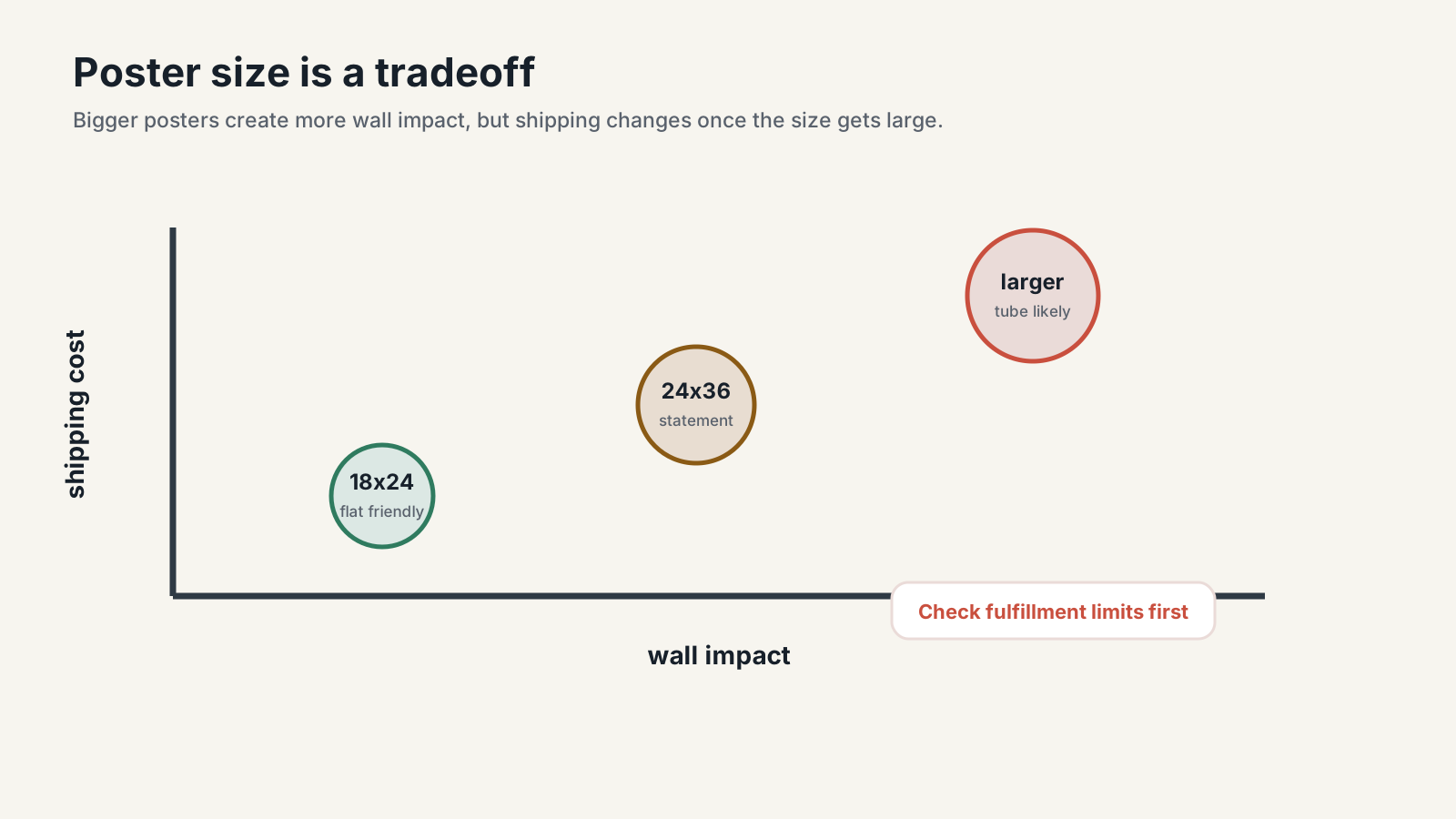
Before adding a large product, verify the exact provider and variant, and calculate shipping by destination rather than base production cost alone, since that's usually where the margin quietly disappears. Check whether multiple posters can share a package, account for replacement rates and how you'll instruct customers to flatten a rolled print, and photograph or mock up the product honestly as framed or unframed.
Common poster-sizing mistakes
"Standard" is doing more work than it's earned
Use "common size" or "widely sold size" instead, unless a specific published standard or product spec actually backs the claim.
Does one crop really work for every ratio?
No. Preview each ratio separately, because important content can disappear when a 2:3 image gets converted to 4:5 or A-series without a fresh look at the composition.
Confusing the print with the finished frame
An 18x24 print does not occupy only 18x24 inches on the wall once a wide frame or mat is added.
File dimensions lie more than sellers expect
A file labeled "300 DPI" in its metadata can still be too small to print well; calculate effective PPI from the actual pixel dimensions and final print size instead of trusting the label. The same goes for bleed. The correct file dimensions are almost always larger than the final trim size, and the only real source of truth is the printer's own template, not a rule of thumb copied from a different provider.
Assuming packaging follows a size rule
One provider ships a size flat while another rolls it into a tube, and framed products almost always follow a different packaging workflow than unframed posters. There's no shortcut here besides asking.
Decorative scale isn't true scale
A beautiful mockup can still mislead buyers if a 12x18 and a 24x36 are shown at nearly the same size on the wall.
Preview artwork at true scale before printing or selling
A dimensions table tells you whether a file fits. A true-scale room preview tells you whether the product feels right above real furniture and whether the listing image communicates that scale.
In WallMockup, upload the artwork, enter the actual print width and height, choose a room, and add the intended frame or mat treatment. Create one hero image, one alternate room, and one clear size-reference view. If the frame is not included, say so in the listing.
Seller workflow: Preview the poster at true scale during WallMockup’s free trial, then export listing images only after the print ratio, frame treatment, and room scale agree.
Key takeaways
- Ratio family matters more than exact inches. 8x10, 11x14, and A2 aren't interchangeable just because they're all "medium," and promising one unchanged crop across several sizes usually breaks something.
- Pixels, bleed, and safe area are three separate checks, not one. A 300-PPI label doesn't guarantee usable resolution, and the correct bleed comes from the printer's own template, not a fixed inch amount you reuse everywhere.
- Print size, frame opening, mat opening, and outer size are four different numbers. Sellers who use them interchangeably in a listing are the ones fielding "this doesn't fit" messages afterward.
- Packaging and shipping cost are set by the provider, not the poster size, so don't assume a cutoff exists before actually checking.
- Nothing here substitutes for seeing the real dimensions on a wall. Preview before locking in a catalog, not after.
FAQ
What are common poster sizes?
18x24 and 24x36 cover most large-format orders, while 8x10, 11x14, and 16x20 cover the frame-friendly sizes that sell fastest on Etsy. 11x17 and 27x40 round out the list for tabloid-format and movie-poster buyers. None of these are mandated by a standards body. They're just what frame makers and print shops settled on.
Is 24x36 a standard poster size?
Yes. 24x36 inches is a widely sold large poster and frame size. Its 2:3 aspect ratio matches 12x18 and 20x30 artwork, but it does not fit 4:5 sizes such as 16x20 without cropping, borders, or a mat.
What frame size should I use for a poster?
For a flush fit, use a frame whose stated opening matches the print, such as an 18x24 frame for an 18x24 poster. For a mat, choose a larger frame and confirm the mat opening, overlap, and outer frame dimensions with the manufacturer.
How many pixels does a poster need?
At 300 PPI, multiply each print dimension by 300: a 16x20 print needs 4800x6000 pixels, and something oversized like an A1 poster needs roughly 7016x9933 pixels. Large work viewed from farther away can often get away with a lower effective PPI, so check the specific printer's minimum before assuming your file falls short.
What poster sizes should Etsy sellers offer?
One or two aspect-ratio families is enough to launch. A practical digital set might cover 2:3 sizes such as 12x18 and 24x36, 4:5 sizes such as 8x10 and 16x20, plus an A-series file for international buyers; physical sellers should confirm each printer's available products, packaging, and frame options before advertising sizes.