Published: August 31, 2026 · Test run: August 31, 2026 · 9 min read
"Batch is faster" is an easy claim to make and a lazy one to leave unmeasured. So we generated the same 12 wall art mockups two different ways inside WallMockup: once through the standard editor, one mockup at a time, and once through Batch Mockups as a single run. Then we timed both, with browser automation instead of a stopwatch and a guess.
The one-by-one workflow took an average of 2.26 seconds of active clicking per mockup at steady state, which projects to about 27.2 seconds for 12 mockups. The batch run generated all 12 previews and exported them as one file in 11.3 seconds total. That's roughly 2.4× faster, and it's a floor, not a ceiling: the automated clicks already knew exactly which room and frame to pick. A real person browsing WallMockup's 440 rooms and 48 frame looks, deciding on each of 12 mockups one at a time, will lose a lot more time than this test measures.
Table of Contents
- The result at a glance
- How this was measured
- The one-by-one run, step by step
- The batch run, step by step
- Why batch wins by more than the raw numbers show
- When one-by-one is still the right call
- Limitations
- FAQ
The result at a glance
| One-by-one (12 mockups) | Batch (12 mockups) | |
|---|---|---|
| Method | 12 separate export cycles | 1 generate + 1 export |
| Measured active time | ~27.2 seconds (projected from steady-state average) | 11.3 seconds (measured end to end) |
| Per-mockup average | 2.26 seconds | 0.94 seconds |
| Output | 12 separate image files | 1 ZIP with 12 images |
| Room/frame decisions required | 12 (repeated) | 1 (up front) |
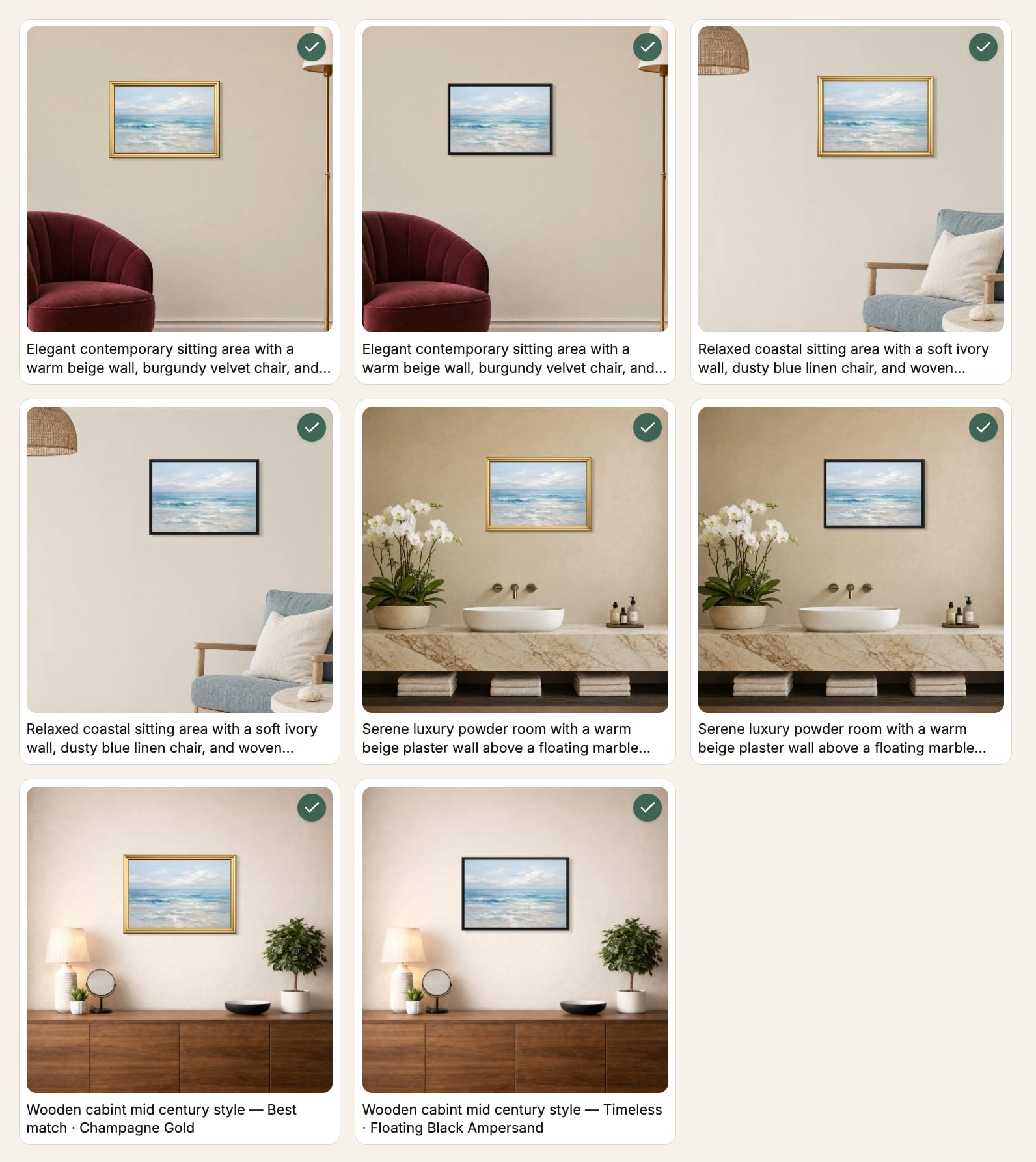
Both runs produced the same thing: one 20×30 in test artwork, placed in 4 rooms with 3 frame looks each, exported as JPEG at 2× resolution. Twelve mockups, either way.
How this was measured
We used Playwright browser automation against a local WallMockup instance, logged in as a real account. Every click, page render, and file download in this test actually happened; none of it was simulated. Automation also strips out human variables like hesitation, mis-clicks, or scrolling to compare options, so what it measures is the floor: how long the interface itself takes once you already know exactly what you want.
One-by-one setup: starting from the WallMockup editor with the test artwork already placed, we ran six full export cycles. Each cycle went: click a room thumbnail, click a frame swatch, click Download, click the format-specific export button in the dialog, wait for the file to finish downloading. We used four real room scenes and three real frame looks (Classic Oak, Floating Black, Modern White) from the catalog, timing from the first click to the completed download event each time.
Batch setup: starting from the same artwork via the "Batch generate" link into /private/batch/new, we selected 4 rooms and confirmed 3 AI-suggested frame looks (the product's own UI showed "4 rooms × 3 frame looks = 12 previews"). From there we timed three phases separately: clicking "Generate previews" to render all 12, opening the export dialog, and clicking "Export" to produce one ZIP file with all 12 images at JPEG, 2× resolution, matching the format and resolution used in the one-by-one run.
Both runs happened back to back, in the same browser session, on the same machine, within a few minutes of each other on August 31, 2026.
The one-by-one run, step by step
Six export cycles were measured. The first took noticeably longer, since it was the first render after loading the editor, when the browser and the app had nothing cached yet.
| Cycle | Time | Notes |
|---|---|---|
| 1 | 7.71s | First render, cold start |
| 2 | 3.39s | |
| 3 | 1.99s | |
| 4 | 2.69s | |
| 5 | 1.67s | |
| 6 | 1.59s |
Excluding that cold-start cycle, the remaining five averaged 2.26 seconds per mockup. That's the number we projected forward: 2.26 × 12 = 27.2 seconds of pure click-and-wait time to produce 12 mockups one at a time, assuming every later cycle behaves like the steady-state average. Include the slower first cycle and the projection climbs to about 38 seconds instead. We're reporting the steady-state number because it's the fairer comparison: a batch run also only pays its setup cost once.
Either way, that number leaves out the time an actual person spends deciding which room or frame to use in the first place. It only counts the mechanical part: selecting an already-decided room, selecting an already-decided frame, and exporting. A real seller picking rooms and frames from WallMockup's 440-room, 48-frame catalog, twelve times over, will take longer than this.
The batch run, step by step
The batch run split cleanly into three measured phases:
| Phase | Time |
|---|---|
| Generate all 12 previews | 3.76s |
| Open the export dialog | 1.04s |
| Export all 12 as one ZIP | 6.52s |
| Total | 11.32s |
Choosing the 4 rooms and 3 frame looks happened before this timer started, in the same shared room-and-frame picker the single-mockup editor uses. That decision cost is the same in both workflows, so it isn't a batch-specific advantage. What batch actually removes is the need to make that decision, or re-navigate that picker, 12 separate times. You make it once, no matter how many mockups come out the other end.
Why batch wins by more than the raw numbers show
The 2.4× speedup from raw timing understates the real difference, for two reasons.
First, the one-by-one number assumes zero decision time, because our automation already knew which room and frame to click before every cycle started. A person doing this by hand reopens the room browser and the frame browser 12 times, and has to either remember their earlier choices or re-decide them on the spot. Batch asks for that decision exactly once.
Second, one-by-one output is 12 separate files that still need organizing: renaming them, sorting by room or listing slot, uploading them one at a time to a marketplace. Batch output is a single ZIP, already grouped, and you can sort the results by room or by frame right in the results screen before you export anything.
Neither of those costs shows up in a raw stopwatch number, and both point the same direction: toward batch, more strongly than 2.4× suggests.
When one-by-one is still the right call
Batch isn't the better tool for every job. If you need exactly one mockup (a single hero image for one listing, in one room, with one frame), opening the standard editor is faster than setting up a batch run for a set of one. Batch pays off by spreading its setup cost across many outputs. With only one output, there's nothing to spread it across.
The break-even is somewhere between "a couple of mockups" and "a dozen." If you're already generating three or more room-and-frame combinations for the same artwork, the numbers in this test say batch is worth it.
Limitations
This is a single timed comparison, not a statistically powered study, and it should be read that way.
- The comparison used one test artwork, one browser, one machine, and one WallMockup account. Network conditions, server load, and image complexity on a given day can move the absolute numbers.
- The one-by-one steady-state average comes from five measured cycles, not fifty. It's a real, measured average rather than an estimate, but it's still a small sample.
- Automated clicks don't include human decision time, mouse movement, or the time spent comparing options before choosing. Read every number here as a floor for one-by-one, and as a fair, complete number for batch, since batch's decision cost stays roughly fixed regardless of set size.
- The one-by-one and batch runs used the same room set but not identical frame names (one-by-one used Classic Oak, Floating Black, and Modern White from the full catalog; batch used three AI-suggested frame looks from WallMockup's Frame Match feature). Both sets contained exactly 3 frame looks, so the combination count and workflow shape are identical, even though the specific frames differ.
- This measures WallMockup's own interface. It says nothing about how other mockup tools' batch or single-image flows compare in speed.
FAQ
Is Batch Mockups actually faster than making mockups one at a time?
In this timed test, yes: 11.3 seconds to generate and export 12 mockups as a batch, versus a projected 27.2 seconds of active clicking to produce the same 12 one at a time. The gap widens further once you count the time a person spends deciding on rooms and frames, since batch only asks for that decision once.
How many mockups make batch worth it?
Based on this test, the break-even is somewhere between a couple of mockups and a dozen. For exactly one mockup, the standard editor is faster because there's no batch setup to amortize. For three or more room-and-frame combinations from the same artwork, batch starts winning.
Did this test use real timing or estimated numbers?
Real timing. Every number in this article came from browser automation clicking through the live WallMockup editor and Batch Mockups flow, timed from the first click to the completed file download, with real files landing on disk. Nothing here was estimated.
What exactly counted as "one mockup" in this test?
One room, one frame look, one exported image file at JPEG, 2× resolution, from the same 20×30 in test artwork. Both runs produced 12 total combinations: 4 rooms × 3 frame looks.
Try it yourself
The fastest way to check these numbers against your own workflow is to run both. Open the art mockup generator for a single mockup, or go straight to the bulk mockup generator to generate a full room-and-frame set from one upload in a single pass.