One artwork · 4 rooms · 3 frame looks · 12 free previews
Generate mockup previewsWall art mockup generator
The free wall art mockup generator for print sellers
Upload one artwork and generate a complete set of listing-ready mockups across rooms and frame looks, all at the real print size. Need one precisely composed image instead? Open the editor and fine-tune the room, frame, mat, placement, and shadow yourself.
- Up to 60 results
- 499+ rooms
- No Photoshop
One precisely composed image with detailed size, frame, mat, placement, and shadow controls.
Open single-mockup editorBatch previews are free. The editor includes a 7-day trial. Export access depends on format, resolution, and plan.
Choose your workflow
Start with the number of images you need
Both paths use true-scale rooms. Batch Mockups multiplies one upload into a complete set, while the editor gives you detailed control over one composition.
Best for listings
Generate a full mockup set
Pair one artwork with several rooms and frame looks in a single pass. Preview every combination free, remove the ones you do not need, then export the strongest set.
- ✓ Up to 60 room-and-frame combinations
- ✓ Consistent artwork size across the whole set
- ✓ Reusable room and frame selections
Best for precise control
Create one mockup in the editor
Pick one room and control the artwork position, dimensions, frame, mat, shadow, and export settings yourself. It is the fastest route to one carefully composed image.
- ✓ Fine placement and sizing controls
- ✓ Frame, mat, and shadow adjustments
- ✓ 7-day editor trial
How to generate a full wall art mockup set
Set up the artwork once, choose the looks you want, and review the complete result grid before exporting anything.
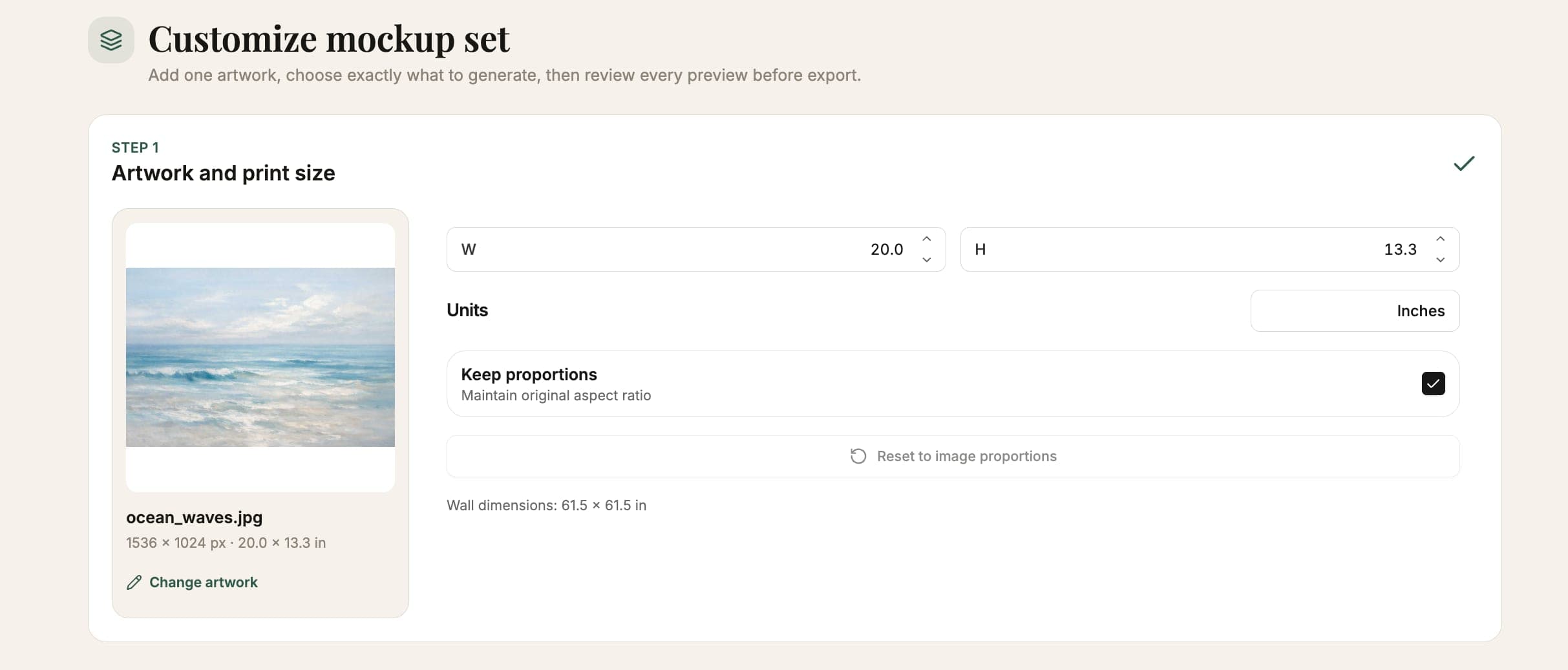
1
Upload your art and set its size
Add a JPG, PNG, or WEBP file and enter the real print dimensions once. That size carries through every result.
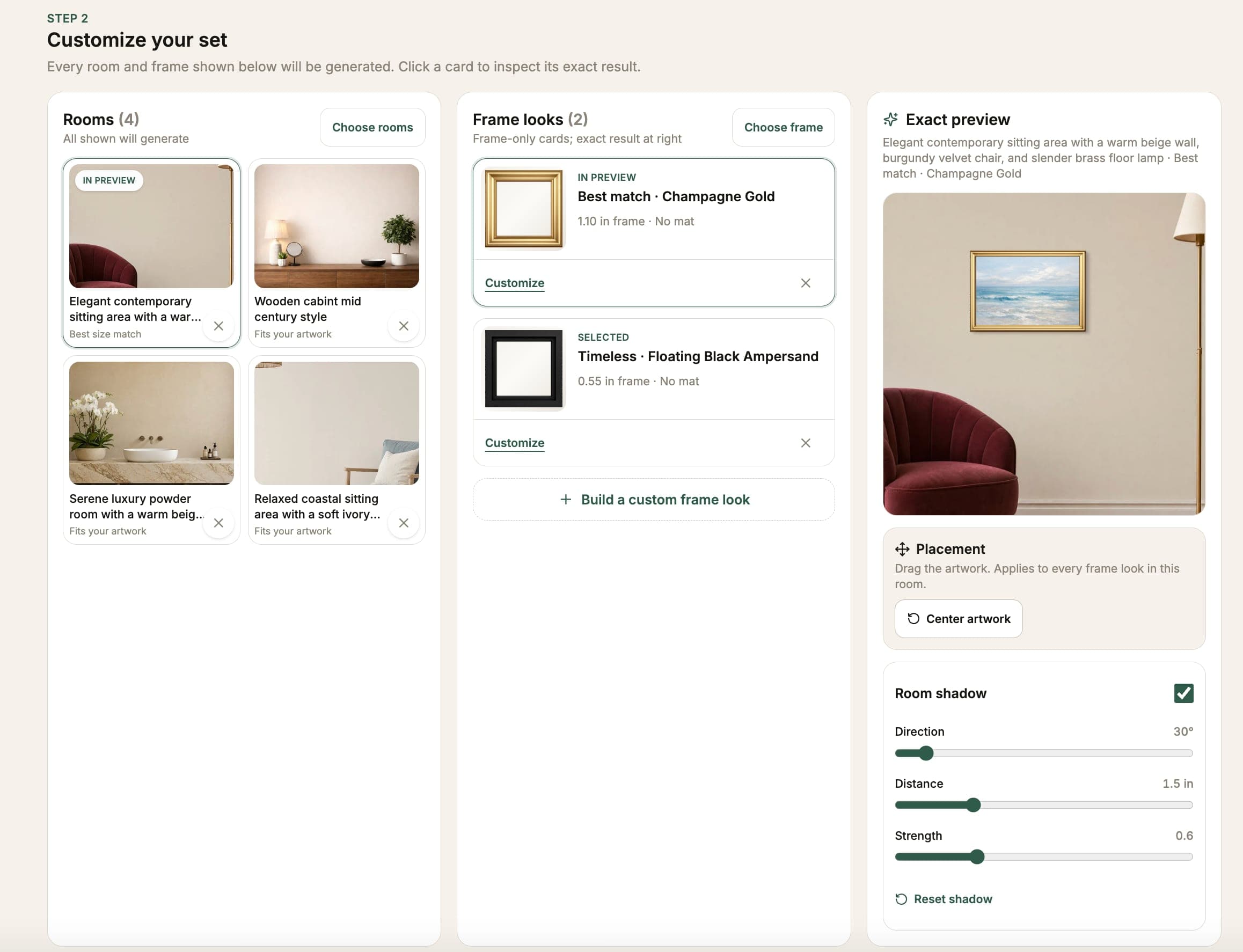
2
Choose rooms and frame looks
Select the interiors and frames that fit your listing. WallMockup builds every room-and-frame combination automatically.
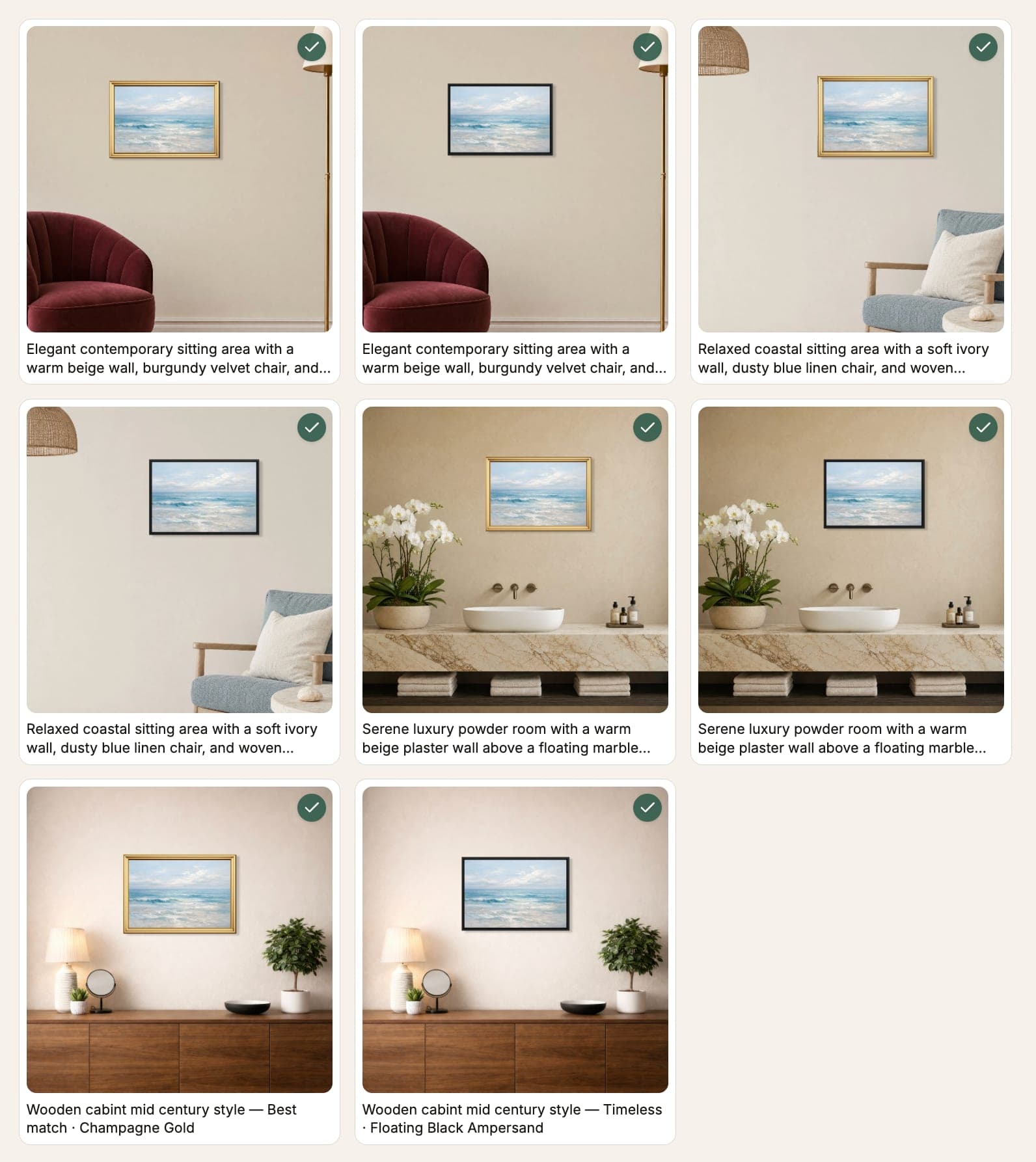
3
Preview the set and export
Review every combination for free, keep the strongest results, and export the images your marketplace needs.
See your complete listing set before you pay
Generate every preview free, then choose which results are worth exporting.
What the wall art mockup generator includes
True-scale placement
Enter real print dimensions in inches or cm. The art appears at the correct size relative to the room, so a 12×16 looks different from a 24×32.
499+ room scenes
Living rooms, bedrooms, hallways, and minimal white walls. Pick the scene that fits the artwork's mood and your target buyer.
Frame and mat controls
Black, white, wood, and gold frames. Optional mat with adjustable width. Shadow depth slider for a photographic finish.
High-res export
PNG, JPG, and WEBP exports at marketplace-ready resolution. Works for Etsy, Shopify, portfolio sites, and print-on-demand platforms.
No templates to manage
Upload once, switch rooms instantly. No Photoshop smart objects, no layer management, no per-template file library.
Works in the browser
No software to install. Open WallMockup, upload your art, and export from any computer or operating system.
Wall art mockup examples
Compare different rooms, frame finishes, and artwork sizes before deciding which images belong in your listing.
Product proof
Know what you are getting before export
WallMockup makes the important decisions visible before payment: scale, room, frame, and the exact results in your set.
- Free batch previews
- Review every selected room-and-frame combination before choosing exports.
- True-scale sizing
- The print dimensions you enter carry through each room, so size stays honest.
- Listing-ready formats
- Export selected mockups as PNG, JPG, or WEBP at the resolution you need.
What makes a strong wall art mockup
A good wall art mockup should feel like real photography. The difference between a credible art print mockup and a template-looking one comes down to three things: accurate scale, honest framing, and a room scene that matches the artwork's mood.
Accurate scale
Set the real product dimensions so a 16×20 looks like a 16×20 next to a sofa, not a 24×36. Honest scale helps buyers choose confidently and reduces avoidable surprises.
The right room
Match the interior to the artwork's mood and intended buyer. A relevant room makes it easier to imagine the print at home without distracting from the art.
Honest framing
Show the frame the customer will receive, or leave it off for an unframed print. Frame, mat, and shadow controls should clarify the product, not embellish it.
Who uses this wall art mockup generator
Etsy and Shopify sellers
Build a consistent set of hero images, room views, and frame comparisons from one upload while keeping every listed print size accurate.
Digital download sellers
Turn a flat printable file into tangible room images that help buyers understand the finished print, its scale, and how it may look framed.
Photographers and fine artists
Compare a large-format piece across realistic rooms and frame styles before a print run, client presentation, or exhibition proposal.
Agencies and interior designers
Present scaled artwork in several interiors without rebuilding a Photoshop composite for every room, frame, and client option.
See also: wall art mockups · frame mockup generator · compare mockup tools
WallMockup vs other wall art mockup generators
Most free mockup tools use fixed templates. You pick a scene, and the art is scaled to fill whatever canvas the template provides. That makes every print look the same size. WallMockup is built differently: you enter real dimensions and the generator calculates where the art sits in the room based on actual inches, not template proportions.
| Feature | WallMockup | Template tools | General design tools |
|---|---|---|---|
| True print-scale sizing | ✓ | ✗ | ✗ |
| 499+ switchable room scenes | ✓ | ✗ | ✗ |
| Frame + mat controls | ✓ | Limited | ✗ |
| No file upload per scene | ✓ | ✗ | ✗ |
| Etsy-ready high-res export | ✓ | ✓ | Manual |
| No software to install | ✓ | ✓ | ✓ |
Pricing
Start free. Pay when it works.
Choose a plan that fits the way you sell art. The 7-day trial includes up to 20 exports in any rolling 24-hour window.
Trial — 7 Days Free
Free
Explore the full editor for 7 days, with up to 20 exports in any rolling 24-hour window.
- Full editor access
- All wall scenes & frames
- PNG and JPEG exports up to 4×
- 20 exports per rolling 24 hours
- No credit card required
No subscription required
Creator pack
$5.99one-time
100 flexible credits
100 flexible credits for AI rooms, HD exports, or any mix.
- 10 listing-ready 2K AI rooms
- 20 preview 1K AI rooms
- Up to 5 Gemini Flash native 4K AI rooms
- 100 HD exports
- Credits never expire
- One-time purchase
Checking your account…
Pro — Monthly
$4.99/ month
For artists actively creating previews and listings.
- Unlimited exports
- 10 flexible credits each month
- 2 preview 1K rooms or 1 listing-ready 2K room
- Full-resolution PNG exports
- JPG & WEBP formats
- All sizes, frames, and scenes
Subscriptions cancel anytime
No hidden fees
Secure payments
Common questions about wall art mockup generators
What is a wall art mockup generator?+
A wall art mockup generator takes your artwork file and places it in a realistic wall or room scene at the correct print size, producing a finished preview image. WallMockup generates wall art mockups, framed art print mockups, and art-on-wall images directly in the browser, with no Photoshop required.
Is WallMockup free?+
WallMockup includes a free 7-day trial with full access to the editor and up to 20 exports in any rolling 24-hour window. After that, a $5.99 Creator pack includes 100 flexible credits for AI rooms and HD exports, while Pro is $4.99/month with unlimited exports plus 10 monthly AI-room credits.
Can I create wall art mockups online without Photoshop?+
Yes. WallMockup is an entirely browser-based online mockup generator. Upload your art file, choose a room scene, set the real print size, add a frame if needed, and export, all without installing any software.
Can I use frames and mats?+
Yes. Choose from black, white, wood, and gold frame styles and add an optional mat with adjustable sizing. Shadow depth is also adjustable so the mockup matches the physical product.
Does it work for Etsy listings?+
Yes. WallMockup exports at the resolution Etsy recommends and produces images that work well as listing hero photos, size-reference images, and detail shots.
What size should wall art mockups be for Etsy?+
Etsy recommends listing images of at least 2000px on the longest side. WallMockup exports at high resolution by default and lets you choose the output size, so you can match Etsy's requirements exactly.
How do I make a wall art mockup for digital downloads?+
Upload your digital art file, choose a room scene that fits the style, set realistic print dimensions, add a frame if appropriate, and export. For digital download listings the art print mockup is effectively the product, so accurate scale and a clean room scene matter most.
What file formats does WallMockup accept?+
WallMockup accepts JPG, PNG, and WEBP uploads. Exports are available as PNG, JPG, or WEBP at the resolution your marketplace needs.
Turn one artwork into a complete mockup set
Preview every combination free, then export only the results you want.