If you are searching for an ArtPlacer alternative, the right answer depends on which part of ArtPlacer you actually use. WallMockup is the most focused replacement for wall art listing images. Placeit fits when wall art is one task in a wider design workflow. ArtPlacer itself remains the strongest choice if you use its gallery, AR, or client-presentation tools.
Table of Contents
- What is the quick difference between ArtPlacer, WallMockup, and Placeit?
- Which tool is best for wall art sellers?
- How do the workflows compare for artists?
- How should you compare pricing?
- When should you choose each tool?
- How should you test before subscribing?
What is the quick difference between ArtPlacer, WallMockup, and Placeit?
ArtPlacer is a full art-business presentation platform. It includes room mockups, AR, presentations, personal spaces, website integrations, virtual exhibitions, and gallery-oriented workflows depending on the plan.
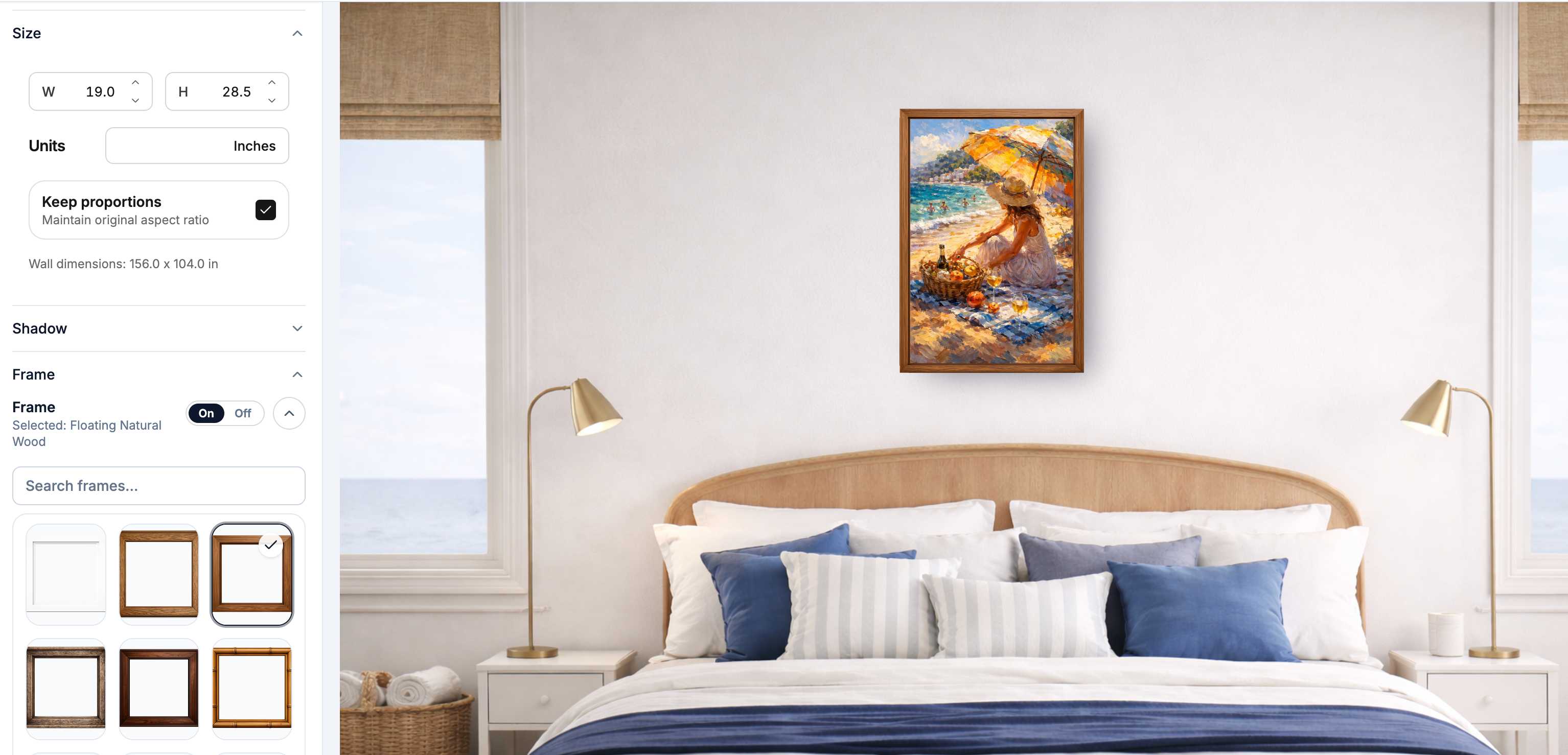
WallMockup is narrower by design. It focuses on one job: upload art, choose a room, set true scale, adjust frame and shadow, and export a believable wall art mockup without a project setup flow.
Placeit is a broad creative-template platform. It includes mockups for many product categories, plus logos, videos, and social templates, so wall art is one use case inside a much wider library.
| Tool | Best for | Main strength | Main tradeoff |
|---|---|---|---|
| ArtPlacer | Galleries, art advisors, artists with presentation workflows | Broad art selling and presentation platform | More platform than many Etsy print sellers need |
| WallMockup | Etsy, Shopify, photographers, print sellers | Fast true-scale wall art mockups | Focused on wall art, not general creative templates |
| Placeit | Multi-product creators and marketers | Broad template library across many asset types | Less wall-art-specific scale and frame control |
Which tool is best for wall art sellers?
For most wall art sellers, WallMockup is the most focused fit. Etsy and Shopify buyers need to understand the art, the room context, the real size, and whether the frame shown matches what they will receive. A narrow tool is usually faster for that job than a broad template platform.
ArtPlacer is still a strong option if mockups are part of a higher-touch sales process. If you need client rooms, AR previews, gallery inventory, virtual exhibitions, or website integrations, the broader platform can justify the extra complexity.
Placeit makes sense when wall art is only one part of your catalog. If you also need apparel mockups, product videos, logo templates, and promotional graphics, one broad subscription may be more practical than a specialized wall art editor.
Short answer: choose WallMockup for listing-ready wall art images, ArtPlacer for gallery-grade presentation workflows, and Placeit for general creative assets.

How do the workflows compare for artists?
The biggest workflow difference is how much product sits around the mockup task. ArtPlacer can be useful when a mockup is only one step in a larger gallery or collector presentation. That power is valuable when you use it, but it can feel heavy if your weekly task is simply exporting listing images.
WallMockup keeps the workflow direct. Open the wall art mockup generator, upload artwork, choose a room, enter real dimensions, pick a frame, tune the shadow, and export. There is no project creation step and no template hunt. For a set of frames, the gallery wall layout planner works out the grid and spacing before you mock anything up; for posters, the poster size chart confirms the dimensions first.
Placeit starts from templates. That can be quick when you need many asset types, but it is less precise for art-specific decisions like true-scale sizing, consistent frame treatment, and showing the same print across a repeatable listing set.
| Workflow step | ArtPlacer | WallMockup | Placeit |
|---|---|---|---|
| Start point | Account/platform workspace | Direct editor | Template search |
| Room mockup focus | Strong, plus broader platform tools | Primary workflow | One mockup category among many |
| True wall-art scale | Available | Core workflow | Template-dependent |
| Frame and shadow control | Available by plan/workflow | Built into editor controls | Template-dependent |
| Best repeat task | Presentation and client-ready visuals | Listing image production | Broad marketing asset creation |
How should you compare pricing?
Do not compare only the monthly sticker price. Compare how often you export, whether you need unlimited downloads, and whether you are paying for broader presentation features you will actually use.
ArtPlacer pricing
These are the prices on the ArtPlacer pricing page, checked on October 20, 2026, in USD. Every plan starts with a 14-day free trial and includes 2,900+ room mockups. ArtPlacer says annual billing saves up to 15%.
| ArtPlacer plan | Billed monthly | Billed yearly (per month) | Artworks | Video credits per 30 days |
|---|---|---|---|---|
| Artist Basic | $9 | $8 | 50 | 1 |
| Artist Standard | $16 | $14 | 100 | 1 |
| Artist Plus | $27 | $23 | 500 | 2 |
| Business Professional | $45 | not checked | 250 | 4 |
| Business Growth | $89 | not checked | 2,000 | 8 |
| Business Premium | $169 | not checked | 10,000 | not checked |
The Basic plan caps design downloads at 30 a day; Standard and above are unlimited. Virtual exhibitions start on Artist Plus. None of the Artist plans remove ArtPlacer's branding. Prices change, so check the page again before you subscribe.
WallMockup's current pricing includes a 7-day free trial, a Creator pack at $5.99 for 100 flexible credits usable on AI rooms or HD exports, and Pro Monthly at $4.99/month for unlimited exports plus 10 monthly room credits. Retired annual, starter, seller, and lifetime offers still resolve for historical purchases but are not the current primary checkout offers.
Placeit pricing should be checked on its live pricing page before publishing exact numbers. Treat it as a general creative-template subscription: its value is highest when you need many mockup and design categories, not only wall art listing images.
| Tool | Pricing lens | Best value if... |
|---|---|---|
| ArtPlacer | Pay for broader art-business tools | You use AR, presentations, website integrations, exhibitions, or gallery workflows |
| WallMockup | Low-cost trial, credits, or monthly wall-art exports | You mainly need repeatable wall art listing images |
| Placeit | Broad template subscription | You need mockups, videos, logos, and social assets across product categories |
When should you choose each tool?
Choose ArtPlacer when you need presentation tools beyond mockup exports. It is the strongest fit here for galleries, art advisors, higher-priced originals, client-facing rooms, and artists who want a larger selling platform around their visuals.
Choose WallMockup when your main output is listing-ready wall art imagery. It is the cleanest fit for independent artists, photographers, Etsy shops, Shopify stores, and print sellers who need believable mockups without a broad platform.
Choose Placeit when your work spans many product categories and you want one general library. It is useful for creators who make wall art sometimes but also need apparel mockups, promotional videos, social posts, and brand graphics.

How should you test before subscribing?
Use the same artwork in each tool. Create one hero listing image, one size-reference image, and one frame variation. Time how long it takes from upload to usable export, not just how good the demo templates look.
Ask five questions:
- Can I set the real print size?
- Does the frame match what I sell?
- Does the output look sharp at listing size?
- Can I repeat the style across a collection?
- Am I paying for features I will use every week?
The best mockup tool is the one that helps you publish clear images consistently. If you sell wall art, the fastest test is to make one real listing image in WallMockup, then compare that result against ArtPlacer and Placeit before paying for a larger platform.
Key Takeaways
- ArtPlacer is the broadest platform and is strongest for gallery, AR, presentation, and client-facing workflows.
- WallMockup is the most focused option for true-scale wall art listing images.
- Placeit is best when wall art is only one part of a wider template and marketing workflow.
- Pricing should be judged by export rhythm and feature use, not sticker price alone.
- Test each tool with the same artwork, same size, and same listing goal before subscribing.
FAQ
Is WallMockup an ArtPlacer alternative?
Yes, for artists who mainly need realistic wall art mockups and listing exports. It is not a full replacement for ArtPlacer's broader gallery, AR, presentation, and website tools. For a longer list of options beyond these three, see the full ArtPlacer alternatives guide.
Is Placeit good for wall art mockups?
Placeit can work for simple wall art mockups, especially if you already use its broader template library. It is less focused on true-scale art presentation than a dedicated wall art tool. For the full breakdown of when Placeit works for wall art sellers and when it's worth switching, see Placeit alternative for wall art.
Which mockup tool is best for Etsy art sellers?
For Etsy wall art sellers, prioritize true-scale sizing, clean room scenes, repeatable styling, and fast exports. WallMockup is the most focused fit among these three.
Should I pay monthly or use credits?
Use monthly billing if you export mockups all the time. Use credits or one-time packs if you create listings in batches.
How much does ArtPlacer cost?
ArtPlacer's Artist plans cost $9, $16, or $27 a month billed monthly, or $8, $14, or $23 a month billed yearly. Business plans start at $45 a month. All plans include a 14-day free trial (prices checked October 20, 2026).
Is ArtPlacer worth the higher price?
It can be worth it if you use broader platform features such as AR, gallery workflows, client presentation, website integrations, or virtual exhibitions. If you only need listing mockups, a focused editor is usually simpler.
Try the focused wall art workflow
If your main need is realistic wall art listing images, start with the WallMockup editor. Upload one product, set the real size, and compare the result against any broader tool before paying for features you may not use.
If you want to compare more than these three tools, see the best art mockup tools guide for a nine-tool comparison that also covers Canva and Photoshop.